Renaissance pet portrait
To make a renaissance pet portrait, upload one clear photo of your pet and choose the Renaissance style. Then the painter dresses your pet in a black doublet with a white ruff collar. It also adds strong old master light, a warm umber background and fine cracks in the varnish.
By The Easelpaw team (Product and testing). Last updated .
1. Your pet photo
JPG, PNG or WebP up to 12 MB
One pet, face toward the camera, good light.
We delete your photos as soon as the picture is made. Only upload photos of yourself or of people who agreed to it.
How to make a renaissance pet portrait, step by step
- First, upload one sharp photo of your pet as a JPG, PNG or WebP.
- Then choose Renaissance in the style picker.
- Next, start the painting and wait for the free preview.
- After that, compare the face, the eyes and the markings with your photo.
- Finally, spend one credit for the clean HD file when the likeness is right.
The first 2 previews each day are free. After that, see the pricing page for packs and plans, or read how we test the tool.
Renaissance pet portrait tested with a real photo
We sent our own test photo through the same style prompt this page uses. So compare the photo with the portrait that came back, and judge the likeness yourself.
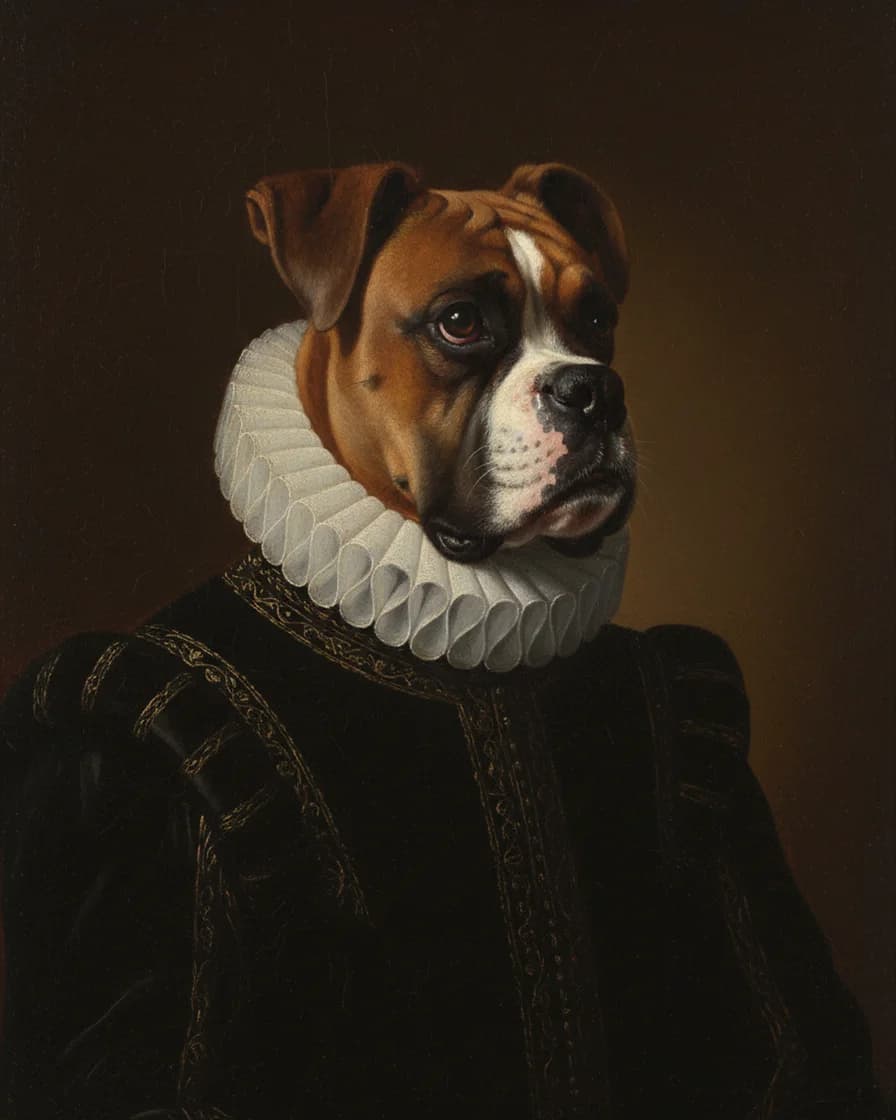
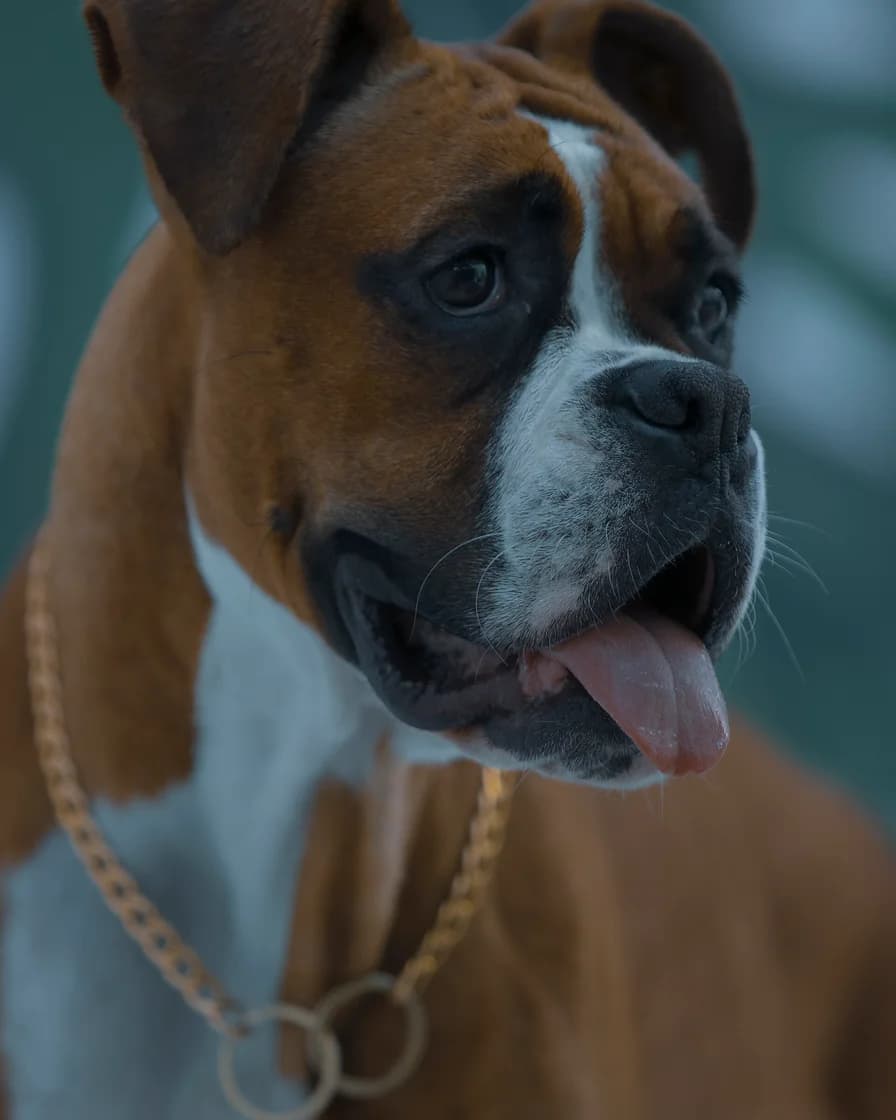
- Test photo
- Boxer dog photo, 1920 x 2880 px, 584 KB JPG
- Result
- Renaissance portrait
- HD file
- 2048 x 2560 px JPG
- Print size at 256 dpi
- 8 x 10 in
- Free preview
- 1024 x 1280 px, watermarked
- Made by
- gemini-2.5-flash-image
- Style prompt
- 85 words
- HD file size
- 937 KB
How we test: every style gets the same two photos, and we compare each portrait with its photo by hand. More on the about page.
What the renaissance pet portrait style changes
The style prompt asks for an old master look. So your pet wears a black doublet with a white ruff collar. Behind the head, the painter lays a warm umber background.
The light does most of the work. Painters call it chiaroscuro, which means strong contrast between light and dark. As a result, one side of the face glows while the other sinks into shadow.
The pose turns calm and slightly to one side, like a sitter in a studio. In addition, the prompt asks for fine cracks in the varnish. Those cracks have a name, craquelure, and they make the picture look centuries old.
What the painter keeps from your photo
The clothes are new, but the animal should stay yours. Each style prompt tells the model to keep the same species, breed, face shape, eye color, coat colors, markings and ear shape. Therefore, a fawn Boxer with a white blaze stays a fawn Boxer with a white blaze.
However, the model can change small details. For example, the ruff covered the chain collar of our test dog, and the exact pattern of spots can shift. So check the free preview before you pay for the HD file.
Photos that suit a renaissance pet portrait
Deep shadow covers a lot of the frame in this style. Because of that, clear light on the face matters even more. Window light from one side works well, since it already hints at the old master mood.
Black and very dark pets need extra care. If the photo shows no detail in the fur, the dark background can swallow the head. So brighten the room first, and pick a shot where you can see both eyes.
A turn of the head to one side also helps, because the prompt asks for a three-quarter pose. Long fur around the neck is fine, although the ruff will cover part of it.
Renaissance or Royal: which one to pick
These two styles look close at first. However, they dress your pet for different centuries. Royal adds a red velvet robe, an ermine collar and a gold chain. Renaissance, in contrast, stays sober with black cloth and a white ruff.
So choose Royal for a funny, grand gift. Choose Renaissance when you want a darker, quieter picture that reads like a museum piece. Both come in the same 4:5 shape, so both fit an 8 x 10 frame.
How to print and frame it
The HD file measures 2048 x 2560 px. That prints at 8 x 10 inches at 256 dpi, which looks sharp on a wall. Larger prints, such as 11 x 14 or 16 x 20 inches, also work, but they look softer up close.
A dark wood or gold frame suits the umber tones. Matte paper also helps, because gloss adds glare over the deep shadows. Then order the print from any lab, since we send a digital file only.
When a renaissance pet portrait is not the right choice
This look is dark and formal. So it can feel heavy in a bright nursery or next to playful decor. Cartoon or Storybook fits those rooms better.
It is also not a real oil painting. An image model makes it, and no brush touches a canvas. So if you want paint you can feel, hire a portrait artist instead. Finally, this style paints one pet per picture, and it does not paint people with pets.
Renaissance style facts
| Part of the picture | What you get |
|---|---|
| Costume | Black doublet with a white ruff collar |
| Light | Strong chiaroscuro, bright face against deep shadow |
| Background | Warm umber |
| Pose | Calm three-quarter view of the head and chest |
| Surface | Fine craquelure in the varnish |
| Shape | Vertical 4:5 |
| Free preview | 1024 x 1280 px WebP with a watermark |
| HD file | 2048 x 2560 px JPG, no watermark |
| Print size | 8 x 10 inches at 256 dpi |
| Upload | JPG, PNG or WebP, up to 12 MB |
Renaissance pet portrait FAQ
What is a renaissance pet portrait?
It shows your pet in the manner of an old master painting. The pet wears period clothes, such as a doublet and a ruff, and sits against a dark background. Here, an image model paints it from your photo.
Is the renaissance pet portrait free?
You can try it for free. Two free previews a day need no account and no card, and each one carries a watermark. After that, one credit returns the clean HD file.
Will my pet still look like my pet?
That is the goal. The style prompt tells the model to keep the breed, face shape, eye color, coat colors, markings and ear shape. Still, small details can change, so judge the free preview first.
Can I choose a different costume?
No, not in this style. The Renaissance prompt always asks for a black doublet and a white ruff. However, the Royal style gives you a red velvet robe and a gold chain instead.
How big can I print it?
The HD file prints at 8 x 10 inches at 256 dpi. You can also go to 11 x 14 or 16 x 20 inches, although those prints look softer up close.
Does it work for cats as well as dogs?
Yes. The prompt keeps the species from your photo, so a cat stays a cat. For a cat, pick a shot at eye level where the eye color shows well.
How much does the HD file cost?
One credit paints one HD portrait. The Portrait pack costs $9.99 one time for 10 credits, and those credits never expire. Monthly plans also start at $9.99.