Pet portrait generator: free previews every day
To use the pet portrait generator free, upload one photo and pick a style. You get two free previews a day with no account and no card. Each free portrait is a 1024 x 1280 px preview with a watermark. The clean HD file without the watermark costs one credit.
By The Easelpaw team (Product and testing). Last updated .
1. Your pet photo
JPG, PNG or WebP up to 12 MB
One pet, face toward the camera, good light.
We delete your photos as soon as the picture is made. Only upload photos of yourself or of people who agreed to it.
How to use the pet portrait generator free, step by step
- First of all, open the tool on this page, since you need no account and no card.
- Then upload one pet photo as a JPG, PNG or WebP file, up to 12 MB.
- Next, pick one of the ten styles, or stay with Anime.
- After that, compare the free preview with your photo.
- Finally, keep the watermarked preview, or spend one credit for the clean HD file.
The first 2 previews each day are free. After that, see the pricing page for packs and plans, or read how we test the tool.
Pet portrait generator free tested with a real photo
We sent our own test photo through the same style prompt this page uses. So compare the photo with the portrait that came back, and judge the likeness yourself.
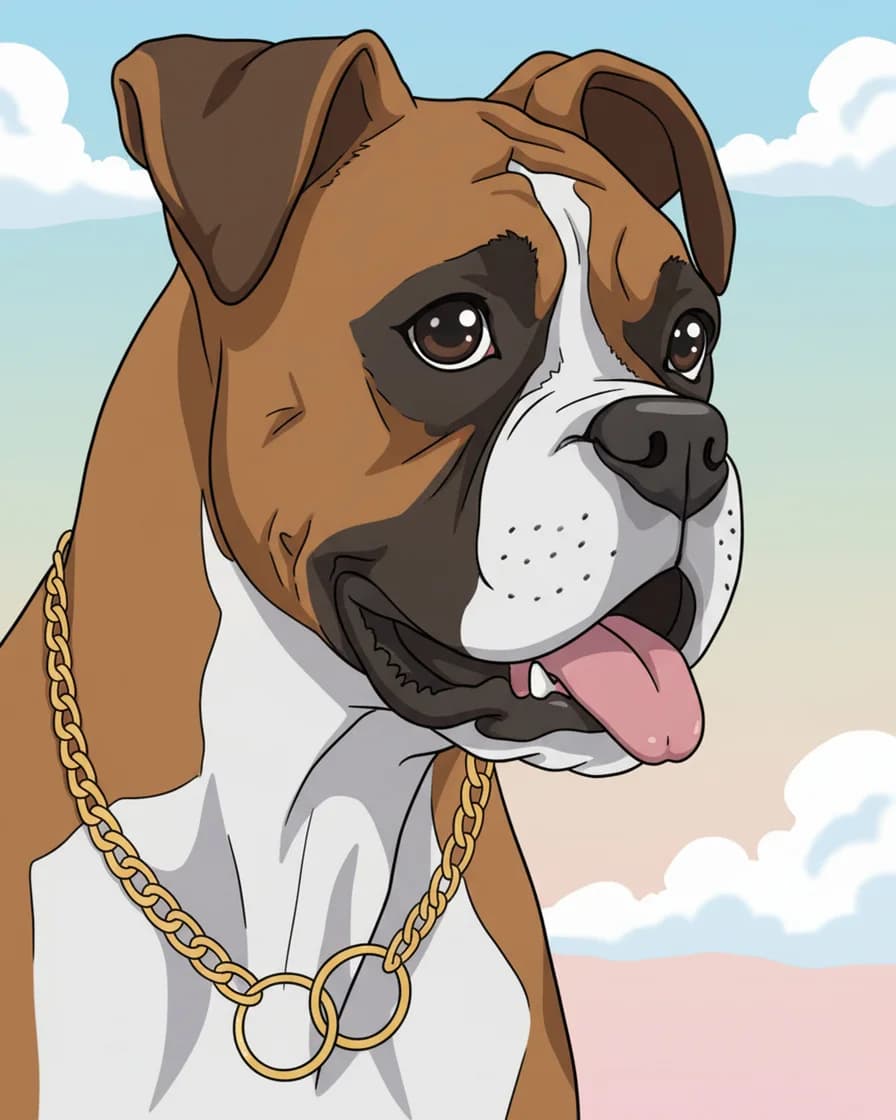
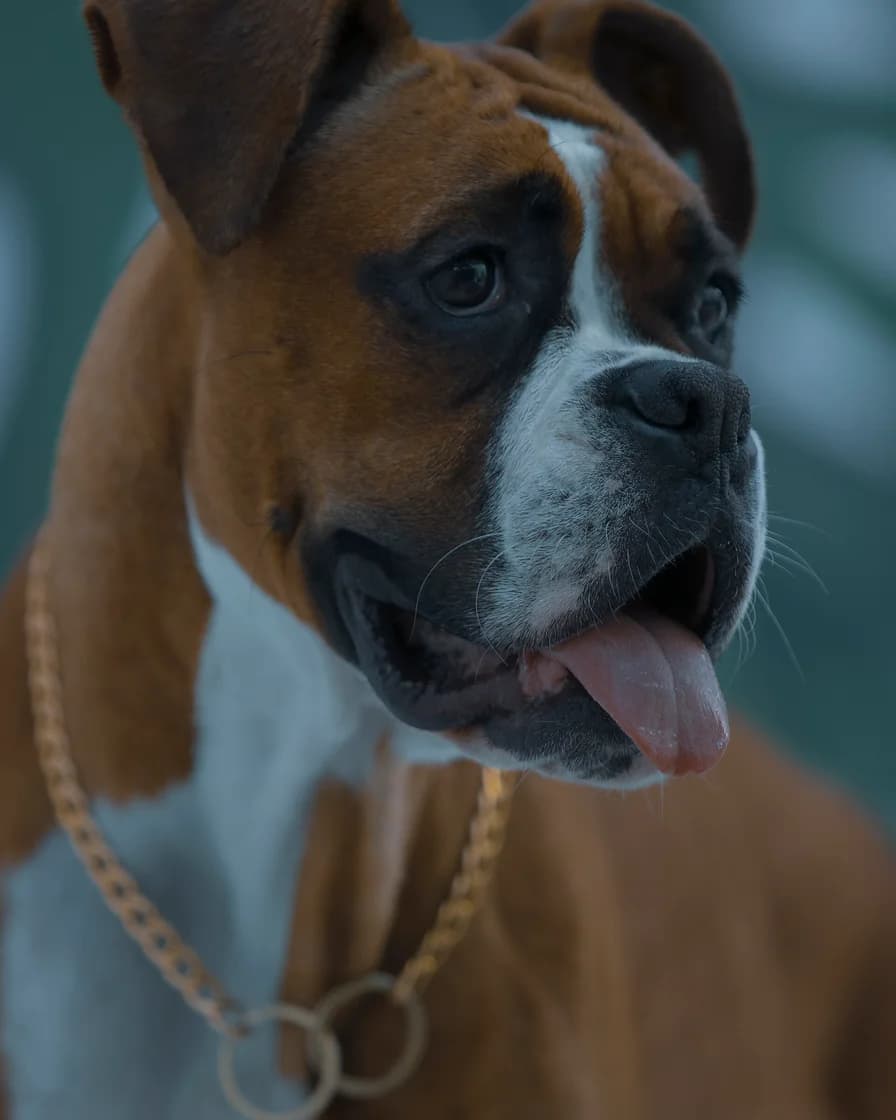
- Test photo
- Boxer dog photo, 1920 x 2880 px, 584 KB JPG
- Result
- Anime portrait
- HD file
- 2048 x 2560 px JPG
- Print size at 256 dpi
- 8 x 10 in
- Free preview
- 1024 x 1280 px, watermarked
- Made by
- gemini-2.5-flash-image
- Style prompt
- 86 words
- HD file size
- 627 KB
How we test: every style gets the same two photos, and we compare each portrait with its photo by hand. More on the about page.
What the free pet portrait generator gives you
Free means a real AI portrait, not a demo. The same image model paints the free preview and the paid portrait. So the preview shows honestly what a style does to your pet.
You get two free previews a day. Each one is a 1024 x 1280 px WebP file with a watermark. You can use any of the ten styles, and you do not sign up or enter a card. The same photo limits apply as for paid runs: up to 12 MB and at least 256 px on each side.
What the watermark is
The watermark is our name, repeated in faint slanted rows across the picture. In addition, a dark strip along the bottom edge says that the file is a preview. You can still judge the eyes, the markings and the style through it.
However, the preview is too small and too marked for a good print. That is the point of it: you see the likeness before you pay, and we keep the print file for buyers.
After the free daily previews run out, the tool changes. It then shows a small 512 x 640 proof with a heavier watermark. A plain photo filter makes that proof, not the AI painter. So treat it as a rough idea only, and come back the next day for a real preview.
Pet portrait generator: free preview vs paid file
One credit paints one portrait and returns the clean HD file. That file is a 2048 x 2560 px JPG with no watermark, so it has four times the pixels of a preview. It prints at 8 x 10 inches at 256 dpi.
The cheapest way to get credits is the Portrait pack. It costs $9.99 one time for 10 HD portraits, and the credits never expire. If you paint often, Studio costs $9.99 a month or $79 a year for 30 portraits a month. Pro costs $24.99 a month for 150 portraits a month.
So what should you pay for? Only for a portrait you already like. Use the free previews to find the right photo and style first, then buy a credit when the preview looks like your pet.
How to get the most from two free previews
Two previews go fast, so choose the photo before you start. Pick one at eye level, in daylight, with sharp eyes and one pet in the frame. The tool crops to a vertical 4:5 shape around the center, so keep the face in the middle.
Then choose a style from the samples on this site instead of guessing. Each style page shows one of our two test photos in that style. As a result, you can compare Oil painting with Watercolor without spending a preview.
This page opens with Anime. It draws crisp thin outlines, two-tone cel shading and large bright eyes, with a soft pastel sky behind your pet.
When the free pet portrait generator is not the right choice
The free preview will not work for a print or a gift, because of the watermark and the small size. For that you need the HD file. Also, we do not print, frame or ship, so plan a visit to a print shop.
A human artist fits better when you want a hand-painted original, two pets together or a painting of a person with a pet. Our painter handles one pet per photo, and it can change small details such as a collar.
Free preview and paid file compared
| Item | Details |
|---|---|
| Free previews | Two a day, no account, no card |
| Free file | 1024 x 1280 px WebP with a watermark |
| Painter for free previews | The AI image model, all ten styles |
| After the daily limit | 512 x 640 px filter proof, heavy watermark |
| Paid file | 2048 x 2560 px JPG, no watermark |
| Price of one credit | About $1 in the $9.99 pack of 10 |
| Pack credits | Never expire |
| Monthly plans | Studio $9.99 for 30 a month, Pro $24.99 for 150 a month |
Pet portrait generator free FAQ
Is the pet portrait generator really free?
Yes, for previews. You get two free previews a day without an account or a card. However, each preview has a watermark, and the clean HD file costs one credit.
Is there a free pet portrait generator with no sign up?
Yes, this one. You upload a photo and get a preview without an account, an email address or a card.
Can I remove the watermark for free?
No. Only the paid HD file comes without the watermark, and it costs one credit. The Portrait pack gives 10 credits for $9.99.
What happens when I use up my free previews?
The tool shows a small 512 x 640 proof with a heavy watermark and asks for credits. A plain photo filter makes that proof, so it is not an AI painting. The free previews return the next day.
How good is the free preview compared with the paid file?
The preview measures 1024 x 1280 px, while the paid file measures 2048 x 2560 px. So the paid file has four times as many pixels and no watermark. The same image model paints both.
Do you keep the photos I upload?
No. We keep a photo in memory only while the painter works. It goes to the model provider for that one request, and we do not store it or the portrait on our servers.