Pet portrait painting from your photo
To make a pet portrait painting, upload one clear photo of your dog or cat and keep the Oil painting style selected. The painter then repaints the photo with thick brush strokes on a muted green background. The free daily previews carry a watermark, while one credit returns the clean HD file.
By The Easelpaw team (Product and testing). Last updated .
1. Your pet photo
JPG, PNG or WebP up to 12 MB
One pet, face toward the camera, good light.
We delete your photos as soon as the picture is made. Only upload photos of yourself or of people who agreed to it.
How to make a pet portrait painting, step by step
- First of all, pick a sharp photo where your pet looks at the camera in soft daylight.
- Then upload it as a JPG, PNG or WebP file of up to 12 MB.
- Next, keep Oil painting selected, or switch to another of the ten styles.
- After that, compare the free preview with your photo, especially the eyes and the markings.
- Finally, spend one credit when you want the clean HD file for printing.
The first 2 previews each day are free. After that, see the pricing page for packs and plans, or read how we test the tool.
Pet portrait painting tested with a real photo
We sent our own test photo through the same style prompt this page uses. So compare the photo with the portrait that came back, and judge the likeness yourself.
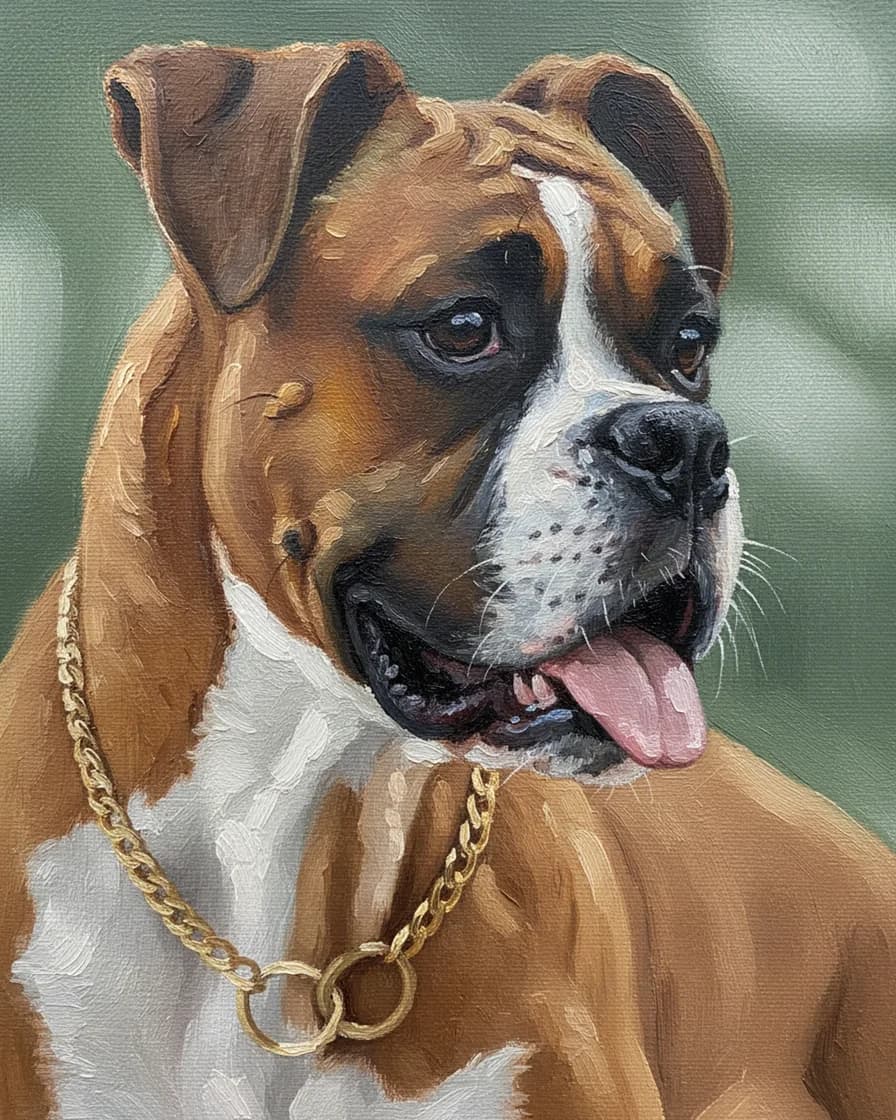
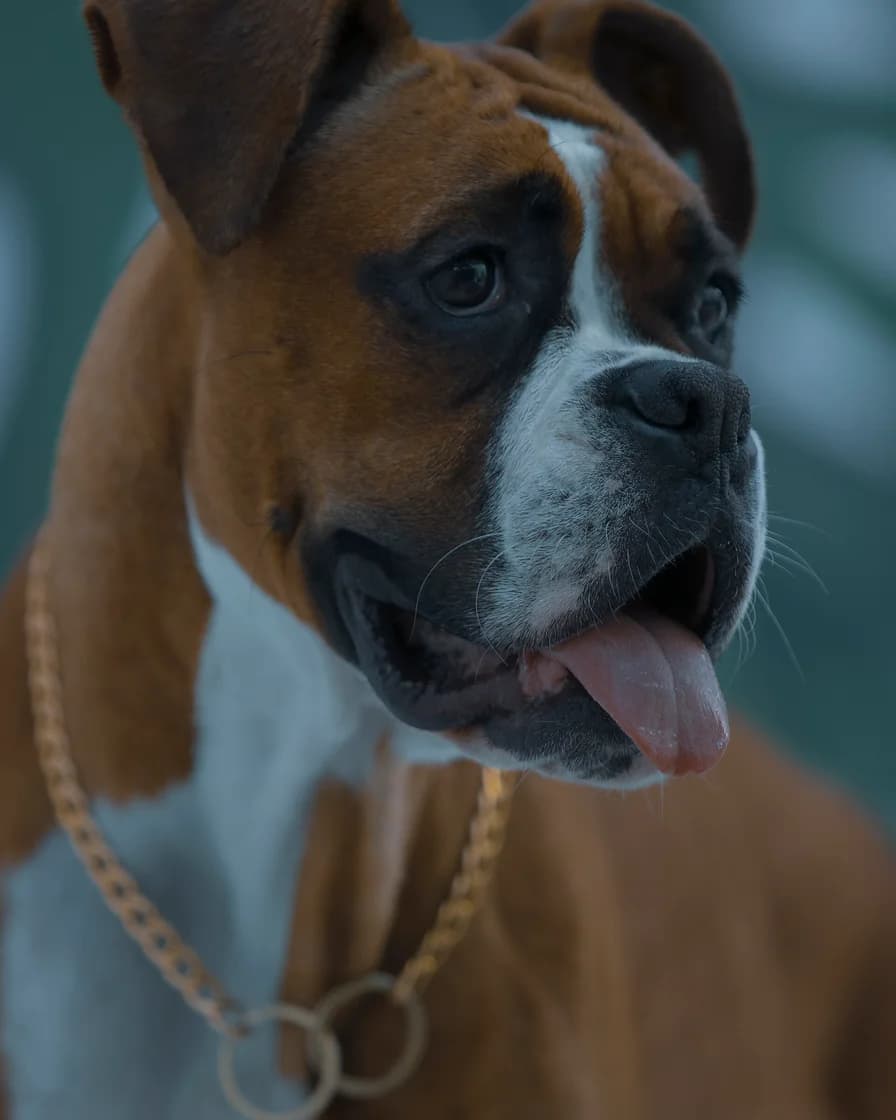
- Test photo
- Boxer dog photo, 1920 x 2880 px, 584 KB JPG
- Result
- Oil painting portrait
- HD file
- 2048 x 2560 px JPG
- Print size at 256 dpi
- 8 x 10 in
- Free preview
- 1024 x 1280 px, watermarked
- Made by
- gemini-2.5-flash-image
- Style prompt
- 87 words
- HD file size
- 1,672 KB
How we test: every style gets the same two photos, and we compare each portrait with its photo by hand. More on the about page.
What the oil style does to a pet portrait painting
The Oil painting style asks the model for thick impasto strokes. Those strokes follow the direction of the fur, so a long coat reads as sweeping paint and a short coat as small dabs. Color also gets richer than in the photo. For example, a fawn Boxer turns warm orange and gold.
The background changes too. Instead of your sofa or garden, the painter puts a plain muted green behind the head. Warm light comes from one side, and a canvas weave shows through the paint. As a result, the picture looks like a studio piece and not like a filtered photo.
Each style prompt also tells the model to keep the same breed, face shape, eye color, coat colors, markings and ear shape. Still, an image model can change small things, such as a collar or the exact pattern of spots. So check the free preview before you pay.
Photos that paint well
Start with a photo from your pet's eye level. Daylight from a window works better than a flash, because flash flattens the fur and makes the eyes glow. In addition, make sure both eyes look sharp.
The tool crops the photo to a vertical 4:5 shape around the center. So keep the head and chest near the middle, with a little space above the ears. One pet per photo works best. A photo with a person in it is a poor fit, because the painted styles show a pet alone.
Dark coats need extra care. A black dog in a dim room gives the painter very little detail, so the brush strokes turn into one dark shape. Instead, shoot near a window, where the light shows how the fur changes direction.
Printing your pet portrait painting
The paid file measures 2048 x 2560 px. That equals 8 x 10 inches at 256 dpi, which looks crisp in a frame on a desk or shelf. Larger sizes, such as 11 x 14 or 16 x 20 inches, also work. However, they print at a lower dpi and look softer up close.
Thick brush strokes hide that softness better than a photo does, so the oil style forgives a big print more than most styles. For a canvas look, ask a local print shop for a matte canvas print. We sell the digital file only, so we do not print, frame or ship anything.
When an AI pet portrait painting is the wrong choice
This is not a hand-painted original. There is no real paint, no texture you can touch and no artist who met your pet. If you want an heirloom on real canvas, commission a painter instead. That route takes longer and costs more, but you get a one of a kind object.
It is also the wrong tool for a group. Two pets in one photo often blend or lose their markings, so paint them one at a time. Finally, when a tiny detail matters to you, such as a scar or a collar tag, look for it on the preview first.
Oil style files and limits at a glance
| Item | What you get |
|---|---|
| Style on this page | Oil painting: thick brush strokes, rich color, muted green background |
| Photo formats | JPG, PNG or WebP, up to 12 MB |
| Smallest photo | 256 px on each side |
| Crop | Vertical 4:5 around the center |
| Free preview | 1024 x 1280 px WebP with a watermark |
| Paid HD file | 2048 x 2560 px JPG, no watermark |
| Sharp print size | 8 x 10 inches at 256 dpi |
| Portrait pack | $9.99 one time for 10 HD portraits |
Pet portrait painting FAQ
Can I get a pet portrait painting from a photo for free?
Yes, as a preview. The free daily previews come as a 1024 x 1280 px WebP file with a watermark, and you need no account or card. However, the clean HD file costs one credit.
Is this a real oil painting?
No. It is a digital image that an AI model paints in an oil style. So you get a file, not a canvas. You can still print it on canvas at a print shop.
Will the painting look like my pet?
Usually, yes. The style prompt tells the model to keep the breed, face shape, eye color, coat colors, markings and ear shape. But small details can change, so compare the free preview with your photo first.
What size can I print the oil portrait?
The HD file prints at 8 x 10 inches at 256 dpi. Larger prints, such as 16 x 20 inches, also work, though they look softer up close.
Do you keep my pet's photo?
No. We hold the photo in memory only while the painter works. The photo goes to the model provider for that one request, and we do not store it or the portrait on our servers.
How much does a pet portrait painting cost here?
The Portrait pack costs $9.99 one time and paints 10 HD portraits, so one painting costs about a dollar. Those credits never expire. Monthly plans start at $9.99 for 30 portraits a month.