AI pet portrait from one photo
To make an AI pet portrait, upload one photo and pick a style. An image model, Google Gemini 2.5 Flash Image, then repaints the photo from a written style prompt and keeps your pet's breed, eye color and markings. The free daily previews carry a watermark, and one credit returns the HD file.
By The Easelpaw team (Product and testing). Last updated .
1. Your pet photo
JPG, PNG or WebP up to 12 MB
One pet, face toward the camera, good light.
We delete your photos as soon as the picture is made. Only upload photos of yourself or of people who agreed to it.
How to make an AI pet portrait, step by step
- First of all, pick one clear photo with a single pet in it.
- Then upload the JPG, PNG or WebP file, up to 12 MB.
- Next, choose one of the ten styles, or stay with Pop art.
- After that, compare the free preview with your photo, because the model can change small details.
- Finally, spend one credit for the clean HD file when the likeness is right.
The first 2 previews each day are free. After that, see the pricing page for packs and plans, or read how we test the tool.
AI pet portrait tested with a real photo
We sent our own test photo through the same style prompt this page uses. So compare the photo with the portrait that came back, and judge the likeness yourself.
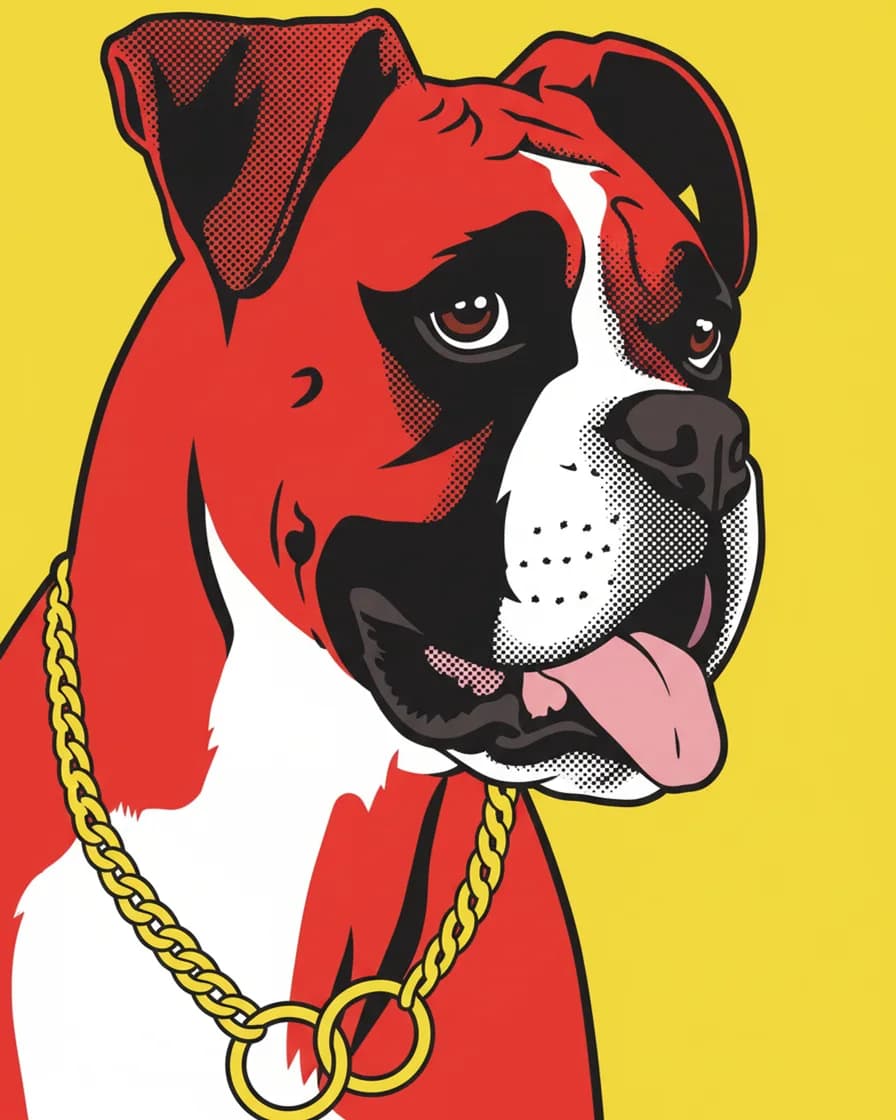
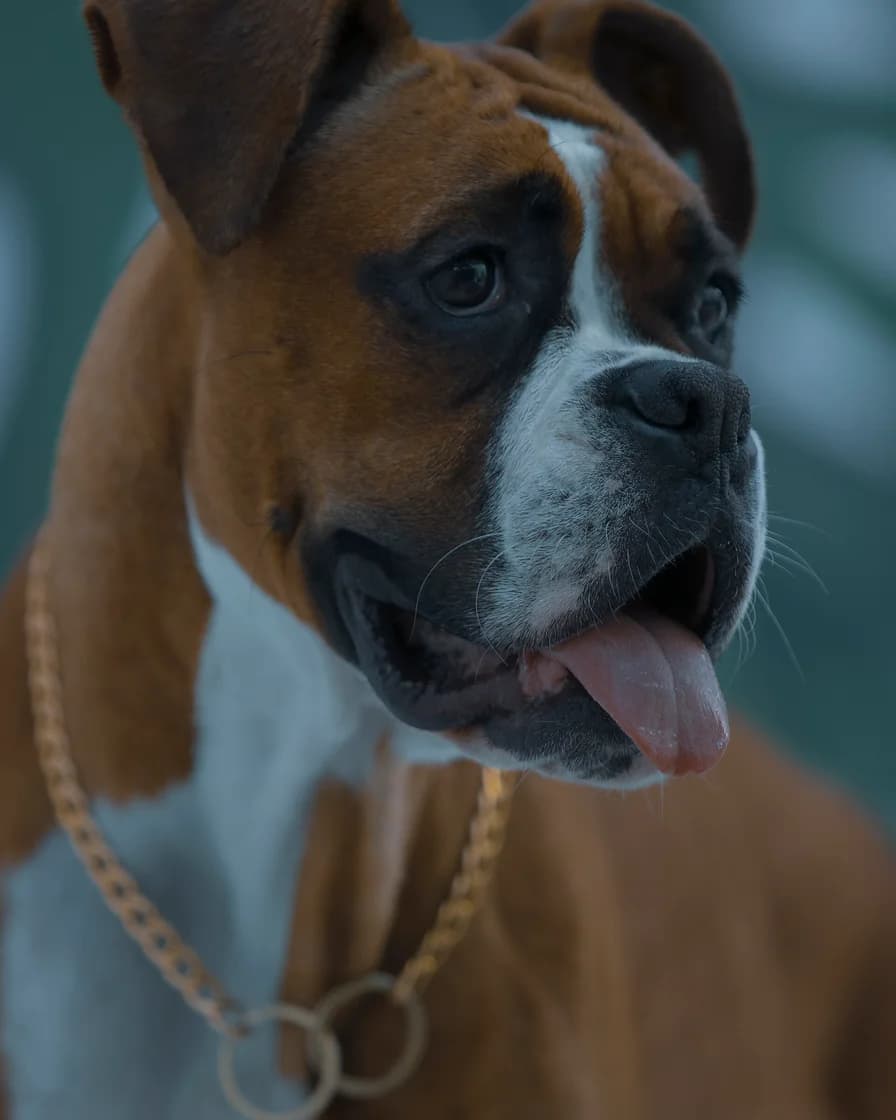
- Test photo
- Boxer dog photo, 1920 x 2880 px, 584 KB JPG
- Result
- Pop art portrait
- HD file
- 2048 x 2560 px JPG
- Print size at 256 dpi
- 8 x 10 in
- Free preview
- 1024 x 1280 px, watermarked
- Made by
- gemini-2.5-flash-image
- Style prompt
- 82 words
- HD file size
- 758 KB
How we test: every style gets the same two photos, and we compare each portrait with its photo by hand. More on the about page.
How an AI pet portrait comes together
The painter is an image model from Google called Gemini 2.5 Flash Image. People also know it by the nickname Nano Banana. It receives two things: your photo and a written style prompt.
Each prompt has two halves. The first half describes the medium, for example a 1960s pop art screen print. Then the second half lists what must stay the same: species, breed, face shape, eye color, coat colors, markings and ear shape. So the model changes the paint, not the pet.
Before that, the tool crops your photo to a vertical 4:5 shape around the center. The request to the model has a 90 second limit. When the daily free previews run out, you see a small 512 x 640 proof instead. A plain photo filter makes that proof, not the AI painter.
What the Pop art style does on this page
This page opens with Pop art, the loudest of the ten styles. It redraws your pet as a screen print in four flat colors. Heavy black shadows shape the face, while halftone dots fill the mid tones. Behind the head sits one bright yellow background.
Because the style uses so few colors, it loves strong contrast. A photo with clear light and dark areas gives a bold poster. However, a soft, evenly lit photo of a pale pet can lose its shape. In that case, try Oil painting or Watercolor instead.
Where an AI pet portrait can go wrong
An image model does not copy pixels. It paints a new picture, so small details can shift. For example, a collar may change color, the whisker count may differ, and a pattern of spots may move a little.
That is why the free preview exists. Compare it with your photo before you pay. Look at the eyes first, then at the markings on the face and chest. When the likeness misses, run it again or use a sharper photo.
Some photos do not suit the tool at all. The art styles paint a pet alone, not a person with a pet, and two pets in one frame often blend. One pet, eye level and daylight: that recipe works best.
When AI is not the right choice
Choose a human artist if you want real paint, a special pose or several pets together. An artist can also fix one detail when you ask, while we cannot edit by hand. In addition, we sell a digital file only, so there is no print, frame or mug.
Still, the generator makes sense for a quick gift, a phone wallpaper or a test of which style you like. It costs little, and you see the result before you spend a credit.
What happens to your photo
We keep the photo in memory only while the painter works. The photo goes to the model provider for that one request. After that, we do not store the photo or the portrait on our servers. So save your file as soon as it appears.
AI pet portrait specs
| Item | Details |
|---|---|
| Image model | Google Gemini 2.5 Flash Image (Nano Banana) |
| Input | One photo, JPG, PNG or WebP, up to 12 MB |
| Photo size | At least 256 px per side, up to 60 megapixels |
| Styles | Ten, from Royal to Soft pastel |
| Crop | Vertical 4:5 around the center |
| Model request limit | 90 seconds |
| Free preview | 1024 x 1280 px WebP with a watermark |
| HD file | 2048 x 2560 px JPG, no watermark, one credit |
AI pet portrait FAQ
What is the best photo for an AI pet portrait?
Use a sharp photo at eye level in daylight, with one pet and both eyes visible. Keep the face near the center, because the tool crops to a vertical 4:5 shape.
Which AI model paints the portraits?
Google Gemini 2.5 Flash Image, the model nicknamed Nano Banana. It repaints your photo from a written style prompt, and each of the ten styles has its own prompt.
Is the AI pet portrait free?
Partly. The free daily previews need no account and no card, but each one carries a watermark. The clean HD file costs one credit, and the Portrait pack gives 10 credits for $9.99.
Will the AI change how my pet looks?
It keeps the breed, face shape, eye color, coat colors, markings and ear shape. However, small details such as a collar or the exact spots can change. So check the preview first.
Can I print the portrait?
Yes. The HD file is a 2048 x 2560 px JPG, which prints at 8 x 10 inches at 256 dpi. Larger prints also work, though they look softer up close.
How long does the AI take?
We have not timed live runs yet, so we will not promise a number. The request to the model has a 90 second limit.
Do you store my photo?
No. We keep it in memory only while the painter works. The photo goes to the model provider for that one request, and we do not store it or the portrait on our servers.