Cartoon pet portrait
To make a cartoon pet portrait, upload one clear photo of your pet and choose the Cartoon style. Then the painter redraws your pet with clean bold outlines, flat bright colors and slightly larger eyes. It also adds a happy expression and a plain sky blue background, while the markings stay true to the photo.
By The Easelpaw team (Product and testing). Last updated .
1. Your pet photo
JPG, PNG or WebP up to 12 MB
One pet, face toward the camera, good light.
We delete your photos as soon as the picture is made. Only upload photos of yourself or of people who agreed to it.
How to make a cartoon pet portrait, step by step
- First, upload one clear photo of your pet, up to 12 MB.
- Then pick Cartoon from the ten styles.
- Next, start the drawing and wait for the free preview.
- After that, check the markings and the eye color against your photo.
- Finally, use one credit to download the clean HD file.
The first 2 previews each day are free. After that, see the pricing page for packs and plans, or read how we test the tool.
Cartoon pet portrait tested with a real photo
We sent our own test photo through the same style prompt this page uses. So compare the photo with the portrait that came back, and judge the likeness yourself.
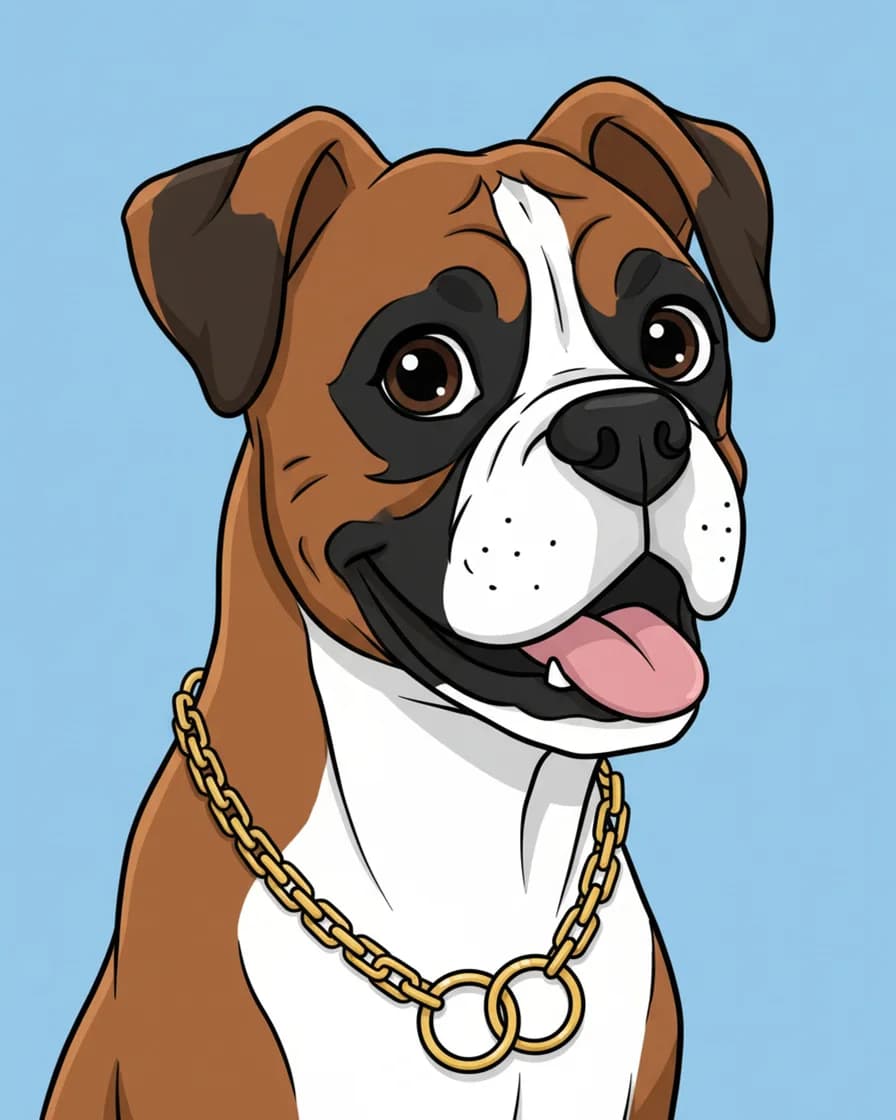
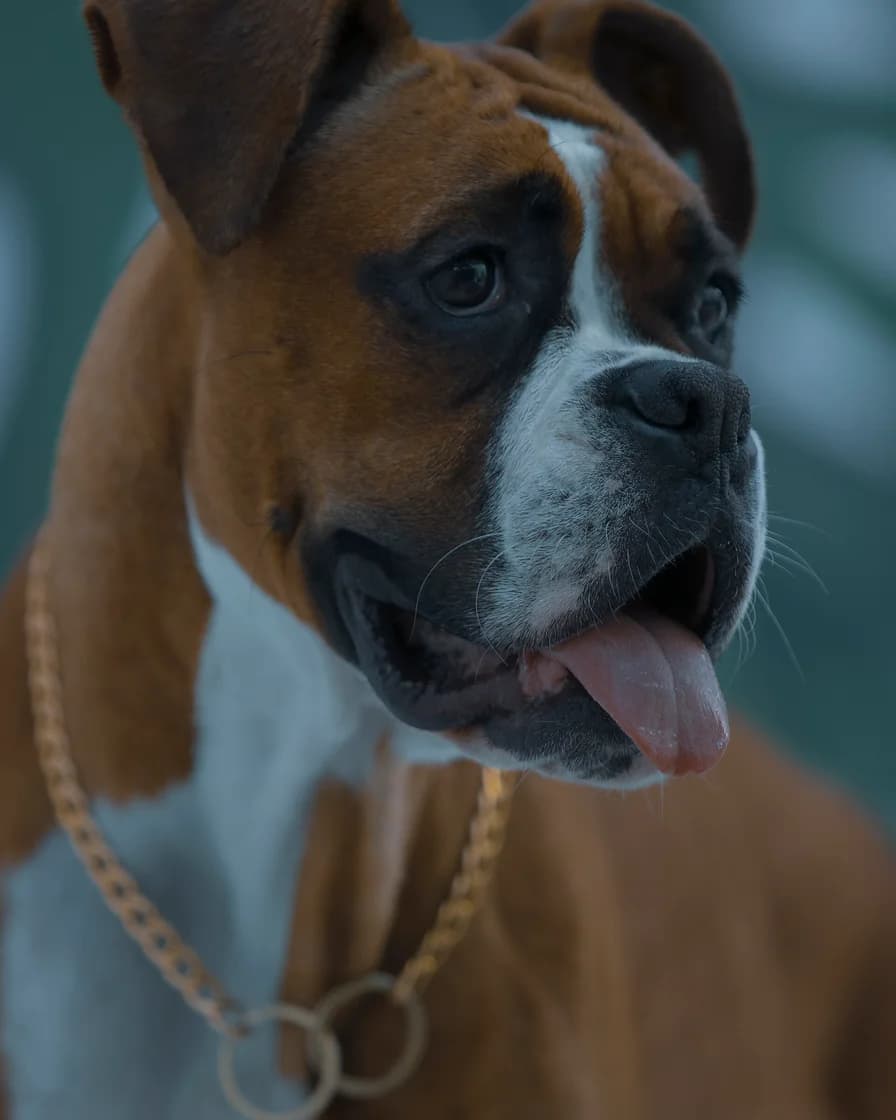
- Test photo
- Boxer dog photo, 1920 x 2880 px, 584 KB JPG
- Result
- Cartoon portrait
- HD file
- 2048 x 2560 px JPG
- Print size at 256 dpi
- 8 x 10 in
- Free preview
- 1024 x 1280 px, watermarked
- Made by
- gemini-2.5-flash-image
- Style prompt
- 81 words
- HD file size
- 590 KB
How we test: every style gets the same two photos, and we compare each portrait with its photo by hand. More on the about page.
What the cartoon pet portrait style does to fur and eyes
A cartoon trades detail for shape. So single hairs go away, and the coat turns into a few flat areas of bright color. Simple cel shading then adds one darker tone for shadow.
Bold outlines hold everything together. They trace the head, the ears and each big marking. As a result, a patch over one eye or a white blaze on the chest stands out more than in the photo.
The eyes grow slightly larger, and the face gets a happy look. However, the eye color should stay the same, because the style prompt asks the model to keep it. Behind your pet, the background becomes a plain sky blue.
Photos that make a good cartoon
Clear shapes matter more than fine texture here. First, choose a photo where the ears and the outline of the head stand out from the background. A dark dog on a dark sofa gives the painter little to trace.
Next, look at the markings. Big patches, masks and socks translate well into flat color. Fine patterns, such as merle flecks or tabby ticking, turn simpler. So expect fewer, bolder stripes.
An open mouth or a tilted head also helps, since the style already leans happy. Still, keep both eyes in view and use one pet per photo.
Where a cartoon pet portrait works best
Flat color stays clear at small sizes. Therefore, this style suits a phone wallpaper, a profile picture or a greeting card. It also fits a kid's room, where a formal oil look would feel stiff.
For print, the HD file measures 2048 x 2560 px, which gives 8 x 10 inches at 256 dpi. Bold lines forgive larger sizes better than soft brushwork does. Even so, 16 x 20 inches will look a bit softer up close.
We deliver a digital file only. So for a mug, a shirt or a canvas, take the file to a print shop of your choice.
Cartoon, Anime or Storybook
Three styles sit close together, so here is the difference. Cartoon uses thick outlines and flat bright color on sky blue. Anime uses thin crisp lines, two-tone shading and large bright eyes under a pastel sky.
Storybook, in contrast, drops the hard outlines. It looks like gouache and colored pencil, with rounded shapes and a small meadow behind the animal. Because you get two free previews a day, you can compare two styles on the same photo.
When a cartoon pet portrait is not the right choice
A cartoon simplifies on purpose. So it is a poor match when you want every whisker and hair, for example in a memorial piece. Pencil sketch or Soft pastel keeps a quieter, closer likeness.
The model can also change small details, such as a collar or the exact pattern of spots. Therefore, check the free preview before you spend a credit. Finally, this is not a hand-drawn original, and it shows one pet, not people with pets.
Cartoon style facts
| Part of the picture | What you get |
|---|---|
| Lines | Clean bold outlines |
| Color | Flat bright colors with simple cel shading |
| Eyes | Slightly larger, same eye color |
| Expression | Happy |
| Background | Plain sky blue |
| Shape | Vertical 4:5 |
| Free preview | 1024 x 1280 px WebP with a watermark |
| HD file | 2048 x 2560 px JPG, no watermark |
| Print size | 8 x 10 inches at 256 dpi |
| Upload | JPG, PNG or WebP, up to 12 MB |
Cartoon pet portrait FAQ
How do I turn my pet into a cartoon?
Upload one clear photo and choose the Cartoon style. Then the painter redraws your pet with bold outlines and flat color. You see a free preview first.
Is the cartoon pet portrait free?
You can try it for free. Two free previews a day need no account and no card, and each one carries a watermark. After that, one credit returns the clean HD file.
Will the cartoon still look like my pet?
It should. The style prompt tells the model to keep the breed, face shape, eye color, coat colors, markings and ear shape. However, a cartoon simplifies fine patterns, so judge the preview.
Can I get a cartoon of my dog and me together?
Not in this style. Cartoon draws one animal and no people, so crop the photo to your pet first. For a picture of you both, open the You + your pet tab instead, which makes a photo-style scene.
Can I print the cartoon on a mug or a shirt?
Yes, but through a print shop of your choice. We deliver a digital file only, a 2048 x 2560 px JPG. That file prints at 8 x 10 inches at 256 dpi.
Can I change the background color?
Not in the tool. The Cartoon prompt always asks for a plain sky blue background. Because that color is flat, though, an image editor can swap it later.
What is the difference between the Cartoon and Anime styles?
Cartoon has thick outlines and flat bright color. Anime has thin lines, two-tone shading and large bright eyes. In addition, the backgrounds differ: sky blue for Cartoon and a pastel sky for Anime.